Get back the first
10 minutes of every workday
Every morning you open the same apps, move the same windows, and rebuild the same context — before you've done a single real task. Define your workspace once. Launch everything with one click.
Features
Stop rebuilding.
Start working.
If you open the same apps every morning and arrange the same windows every morning — Scenerun ends that tax for good.
Smart Profiles
Save your workspace once — every app, every window position — and recall it with one click. One profile per context: work, design, writing, admin.
App Detection
Find any installed app in seconds without digging through Finder. Scenerun scans your Mac automatically — just type to find, click to add.
One-Click Launch
Hit one key and walk away. Every app opens in sequence, no babysitting required. If you already launched today, it won't fire twice.
Window Layouts
Windows land where you need them — no dragging, no resizing. Choose from 9 presets and every app arranges itself on launch.
Global Shortcuts
Switch your full context — all apps, all windows — from any app with a single shortcut. No clicking, no app switching.
macOS Native
Lives quietly in your menu bar. Launches at login, follows your macOS theme, and stays out of your way until you need it.
Data Safety
Your profiles are never lost — not to a crash, not to a bad update, not to anything. Automatic backups run silently in the background.
Accessible
Works the way you work — keyboard-first, VoiceOver-ready, motion preferences respected.
Screenshots
See it in action
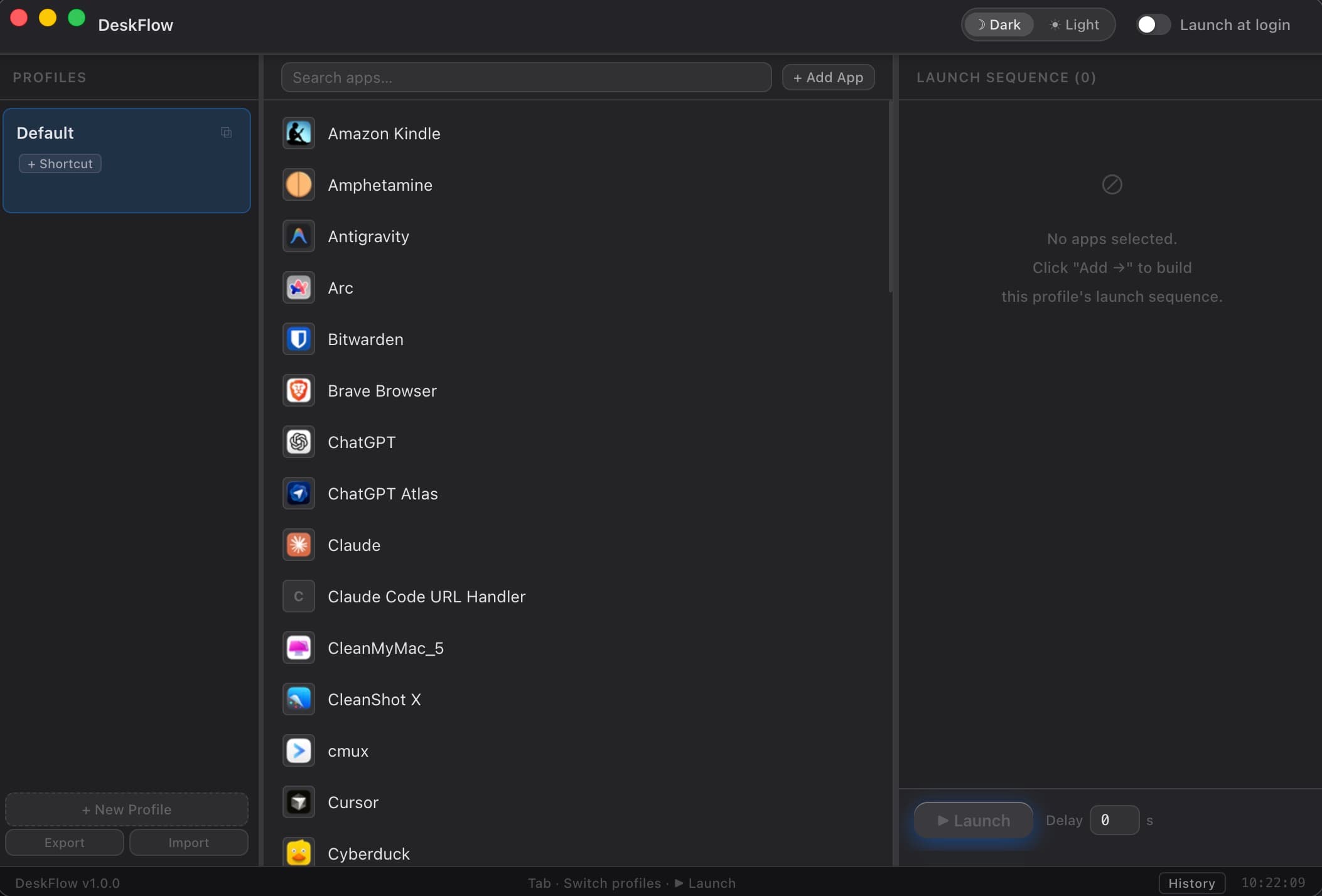
Your whole workspace — apps, shortcuts, launch sequence — at a glance.
How It Works
Three steps. Zero friction.
Create a Profile
Name it, pick a shortcut, and choose your apps. Takes two minutes — and you'll never set up this workspace from scratch again.
Add Your Apps
Browse your installed apps and pick which ones belong. Set where each window lands. Do it once and it's done.
One Click, Done
Hit Launch or press your shortcut. Apps open in sequence, windows arrange themselves. First real task of the day: actual work.
Starter Templates
Your workspace, ready in seconds.
Pick a template and your profile is ready to launch. One is free — the rest unlock with Premium.
Relax
Spotify + Chrome. Unwind after work — nothing else.
Developer
Designer
Writer
Deep Work
Standup
Relax is included in the free plan. Developer, Designer, Writer, Deep Work, Standup, and DevOps require Premium.
Roadmap
Built openly.
Every update, forever included.
Pay once and every new feature, fix, and improvement that ships is yours automatically. Here's everything built so far and what's coming.
Core
- Smart Profiles — save any workspace, switch contexts in seconds
- App Detection — all installed macOS apps with real icons
- One-Click Launch — open 8 apps and arrange every window with one keypress
- 9 Window Layout Presets — windows land exactly where you need them
- Global Shortcuts — switch your full context from any app, no mouse
- Menu Bar Tray — quick-launch from anywhere
- Launch History — see which workspaces you actually use and when
- Export / Import — backup and share your setup in one click
Automation
- Custom Window Layouts — pixel-precise zones per display
- Multi-Monitor — each screen starts loaded with what belongs there
- Window Position Restore — save where every window is, recall it on next launch
- Launch Chains — automate the manual steps you repeat after opening each app
Personalization
- Premium Themes — Nord, Catppuccin, Dracula, Rosé Pine, Solarized, Tokyo Night
- Profile Templates — 7 ready-made workspaces including a free Relax starter
Distribution
- License & Activation — one-time purchase, 2 Macs, no renewals ever
- 14-day Free Trial — test all premium features before buying
Homebrew Install
Install Scenerun with a single `brew install --cask scenerun` command.
iCloud Sync
Profiles stay in sync across all your Macs automatically
Siri Shortcuts
Trigger any workspace from Shortcuts.app or with your voice
Team Sharing
Share any workspace with a teammate in one click
macOS Widgets
Trigger any workspace from your desktop, no app switching
Pricing
Simple, one-time price.
Yours forever.
No subscriptions. Pay once and never think about it again. One purchase covers 2 Macs and every future version.
Free
Forever free. No card required.
- Up to 3 ready-to-launch workspaces
- Launch all your apps in one click
- Windows land where you need them, automatically
- Switch context from any app with one keystroke
- Always one click away, from any app
- Backup or share your setup in seconds
- Track which workspaces you actually use
- macOS dark & light mode
- Relax template — Spotify + Chrome, ready to use
Premium
Pay once. No renewals, no subscription, no second thoughts.
- Everything in Free
- Unlimited workspaces — one for every context
- Every app in its exact spot, pixel-perfect
- Each screen starts loaded with what belongs there
- Close everything in one click, restore it tomorrow
- Automate the manual steps you repeat after each app opens
- 6 ready-made workspace templates (Developer, Designer, Writer, and more)
- Premium Themes (6 color schemes)
- Priority support
2 Macs per license
Use on your personal and work Mac with one purchase.
Lifetime updates
As Scenerun grows, your copy grows with it. Free.
License key
Instant delivery by email. Activate in the app in seconds.
FAQ
Common questions
What macOS versions are supported?
Scenerun requires macOS 13 Ventura or later. It works on both Intel and Apple Silicon Macs.
Is there a free version?
Yes — the core app is free forever. You get up to 3 workspaces and all essential features. Premium unlocks unlimited workspaces plus full automation: Custom Layouts, Launch Chains, window position restore, and more.
Can I use my license on multiple Macs?
One license covers 2 Macs — perfect for a personal machine and a work laptop.
Can I install it via Homebrew?
Homebrew Cask support is coming very soon — the formula is ready, pending app notarization. For now, download the .dmg directly from this page.
What data does Scenerun collect?
None. Scenerun stores all data locally on your Mac. No telemetry, no analytics, no network requests of any kind — it only launches apps through macOS APIs.
Does it work offline?
Fully. Scenerun has no internet dependency — it just launches apps via macOS APIs.
What is your refund policy?
If Scenerun doesn't work as advertised on your Mac, email us within 30 days for a full refund. No questions asked.
Do you offer team or volume licenses?
Not yet — team licenses are planned for v1.2+. Reach out if you need volume pricing in the meantime.
Stay Updated
Get notified on updates
New features, improvements, and releases. No spam, unsubscribe anytime.